


USB to 20 Button Pulse Generator Model 2120/2125
EASILY Interface Your Toggle/Rocker Switches to Your Computer

Easily Interface up to 20 Toggle or Rocker Switches to
Microsoft's Flight Simulator FS2002, FS2004,
FS X and X-Plane
Microsoft's Flight Simulator FS2002, FS2004,
FS X and X-Plane
Completely Assembled/Tested
* Just Plug Interface into USB Port
* Board sensed as "Model 2120"
* EASILY Add Up to 20 Toggle/Rocker Switches
* Use FS 'Settings' to Assign Functions
* Uses Standard USB Connector
* Internal "1/4 second Pulse Generator" Code
* NOTE: Switches Not Included
* NO Outside Power Required
* Works with All FSUIPC Digital Functions
* Use FS 'Settings' to Assign Functions
* Requires a Series "B" Female USB Cable
* Easy Programming Instructions
* Board sensed as "Model 2120"
* EASILY Add Up to 20 Toggle/Rocker Switches
* Use FS 'Settings' to Assign Functions
* Uses Standard USB Connector
* Internal "1/4 second Pulse Generator" Code
* NOTE: Switches Not Included
* NO Outside Power Required
* Works with All FSUIPC Digital Functions
* Use FS 'Settings' to Assign Functions
* Requires a Series "B" Female USB Cable
* Easy Programming Instructions
Dramatically Increase the realism of your Cessna 172 flight by adding external control panels in place of point and click Mouse or keyboard input.
You can Add up to 20 Toggle and or Rocker Switches to your Flightdeck; Easily and Expensively. Unlike our 2040 INTERFACE that was designed exclusively for Push Button Switches; the 2120 has a built-in 1/4 second pulse generator, thus allowing standard SPST Toggle/Rocker Switches to be connected directly to the 2120 without the use of an outside circuit board. All pulses are created within the 18F2550 USB Chip code.
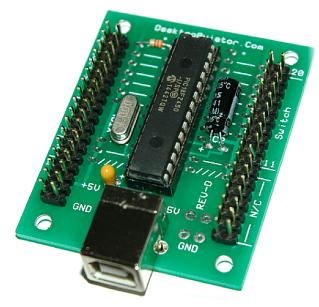
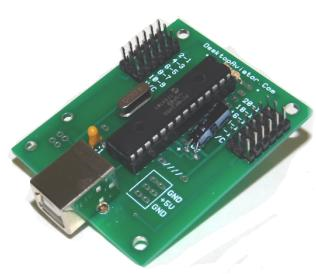
Just connect the two wires from the Toggle Switch Terminals to the J1 and J2 male connectors located on either side of the 2120 board; Plug the 2120 into an unused USB Port; program with a aircraft function and away you go on your next, more realistic flight.
To make the switch connections to the 2120 board easier, we designed the
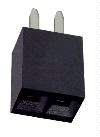
2120 to accommodate twenty 2-pin Female Connectors. Just solder the
switch to the two terminals, then plug the connector into the board. What
can be Simplier? We also supply these connectors with your 2120 purchase.
If you need extra, these Connectors can be purchased on our FS Parts Page
located at: https://www.desktopaviator.com/Products/parts.htm or from the link below.
The 2120 was designed for EASE of Installation and EASE of Programming. Even if you have limited Electronics Experiance or none at all, the 2120 is the Flight Sim Add-on for You!
By adding multiple 2120s to your computer, you can add 20, 40, 60 or even 80 Toggle and Rocker switches for the Ultimate Flightdeck.
Sense the realism of flipping a toggle switch to turn your 'Fuel Pump' On or Off; MASTER Alt, MASTER Bat; the uses are as ENDLESS as Your Imagination . . .
You can Add up to 20 Toggle and or Rocker Switches to your Flightdeck; Easily and Expensively. Unlike our 2040 INTERFACE that was designed exclusively for Push Button Switches; the 2120 has a built-in 1/4 second pulse generator, thus allowing standard SPST Toggle/Rocker Switches to be connected directly to the 2120 without the use of an outside circuit board. All pulses are created within the 18F2550 USB Chip code.
Just connect the two wires from the Toggle Switch Terminals to the J1 and J2 male connectors located on either side of the 2120 board; Plug the 2120 into an unused USB Port; program with a aircraft function and away you go on your next, more realistic flight.
To make the switch connections to the 2120 board easier, we designed the
2120 to accommodate twenty 2-pin Female Connectors. Just solder the
switch to the two terminals, then plug the connector into the board. What
can be Simplier? We also supply these connectors with your 2120 purchase.
If you need extra, these Connectors can be purchased on our FS Parts Page
located at: https://www.desktopaviator.com/Products/parts.htm or from the link below.
The 2120 was designed for EASE of Installation and EASE of Programming. Even if you have limited Electronics Experiance or none at all, the 2120 is the Flight Sim Add-on for You!
By adding multiple 2120s to your computer, you can add 20, 40, 60 or even 80 Toggle and Rocker switches for the Ultimate Flightdeck.
Sense the realism of flipping a toggle switch to turn your 'Fuel Pump' On or Off; MASTER Alt, MASTER Bat; the uses are as ENDLESS as Your Imagination . . .
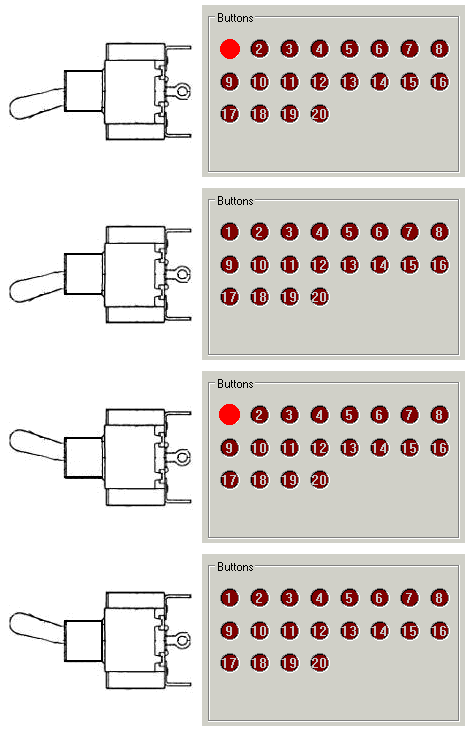
With Our NEW! '20 Button Pulse Generator'
The 2120 will product one pulse when you flip the toggle switch ON. And a second pulse will be generated when the same toggle switch is flipped to OFF.
Toggle switches can be programmed using FS2002, 2004, FSX ASSIGNMENTS:
Master Battery/Alt on-off
Panel Lights on-off
Fuel Pump on-off ect.
And FSUIPC as:
Toggle Master Battery Alternator
Toggle Taxi Lights
Toggle Avionics Master ect.
The one toggle switch will produce two pulses; one for
ON and the second when OFF.
Toggle switches can be programmed using FS2002, 2004, FSX ASSIGNMENTS:
Master Battery/Alt on-off
Panel Lights on-off
Fuel Pump on-off ect.
And FSUIPC as:
Toggle Master Battery Alternator
Toggle Taxi Lights
Toggle Avionics Master ect.
The one toggle switch will produce two pulses; one for
ON and the second when OFF.
USB Interface Measures: 1.88 x 2.30 inches
The USB Cable Not Included
The USB Cable Not Included
USB to 20 Button Pulse Generator
Microsoft Flight Simulator FS2000, FS2002, FS2004 & X-Plane
Microsoft Flight Simulator FS2000, FS2002, FS2004 & X-Plane
Any Questions? Feel Free to contact us at:
DesktopAviator@USA.com
DesktopAviator@USA.com
$38.00 Plus Shipping/Handling
Comes with one Connector Packet
Ordering Information . . . .
For Purchase Using PayPal
Comes with one Connector Packet
Ordering Information . . . .
For Purchase Using PayPal

Our PayPal Account name is: Support@DesktopAviator.com
Click HERE for wiring Instructions
U.S. & Canadian Orders ONLY PLEASE! (For International - See Below)
USB to 20 Button Pulse Generator Interface (Model 2120)
USB to 20 Button Pulse Generator Interface (Model 2120)

Place Your Order HERE
Click HERE to use your PayPal Account
Click HERE to place your order using our Secure Online Credit Card Server (HTTPS).
Or you can Request an Invoice to be emailed to you. Then just follow the LINK provided in this email and use your PayPal Account or Major Credit Card to complete the Transaction.







Desktop Aviator HOME Page
International Shipping Info
2120
$38.00
* Just Plug Interface into USB Port
* Add Up to 20 SPST Toggle Switches
* Use FS 'Settings' to Assign Functions
* Uses Standard USB Connector
* NOTE: Switches Not Included
* NO Outside Power Required
* Works with All FSUIPC Digital Functions
* Use FS 'Settings' to Assign Functions
* Requires a Series "B" Female USB Cable
* Easy Programming Instructions
Click HERE for Installation Instructions
Designed Exclusively for 3-pin Extension Cable
Assembly for FASTER connection of Toggle/Rocker
switches to the J1/J2 Inputs
* Add Up to 20 SPST Toggle Switches
* Use FS 'Settings' to Assign Functions
* Uses Standard USB Connector
* NOTE: Switches Not Included
* NO Outside Power Required
* Works with All FSUIPC Digital Functions
* Use FS 'Settings' to Assign Functions
* Requires a Series "B" Female USB Cable
* Easy Programming Instructions
Click HERE for Installation Instructions
Designed Exclusively for 3-pin Extension Cable
Assembly for FASTER connection of Toggle/Rocker
switches to the J1/J2 Inputs
Click HERE to use your PayPal Account
Click HERE to place your order using our Secure Online Credit Card Server (HTTPS).
Or you can Request an Invoice to be emailed to you. Then just follow the LINK provided in this email and use your PayPal Account or Major Credit Card to complete the Transaction.







2125
$38.00
Attention International Customers
If you live outside of the U.S. & Canada and wish to purchase this item: Please email us your complete shipping address. We will be more then happy to email you the required shipping Fees.
Any Over Payments are Quickly REFUNDED via PayPal.
For International Sales, Please read the
Terms & Conditions for Worldwide Shipping
Click Here to eMail us:
DesktopAviator@USA.com
If you live outside of the U.S. & Canada and wish to purchase this item: Please email us your complete shipping address. We will be more then happy to email you the required shipping Fees.
Any Over Payments are Quickly REFUNDED via PayPal.
For International Sales, Please read the
Terms & Conditions for Worldwide Shipping
Click Here to eMail us:
DesktopAviator@USA.com
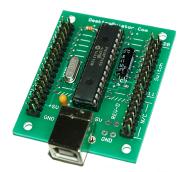
2125 USB Interface Designed for use with
3-pin Extension Cables
3-pin Extension Cables
Board Measures 2.25 inches by 1.875 inches